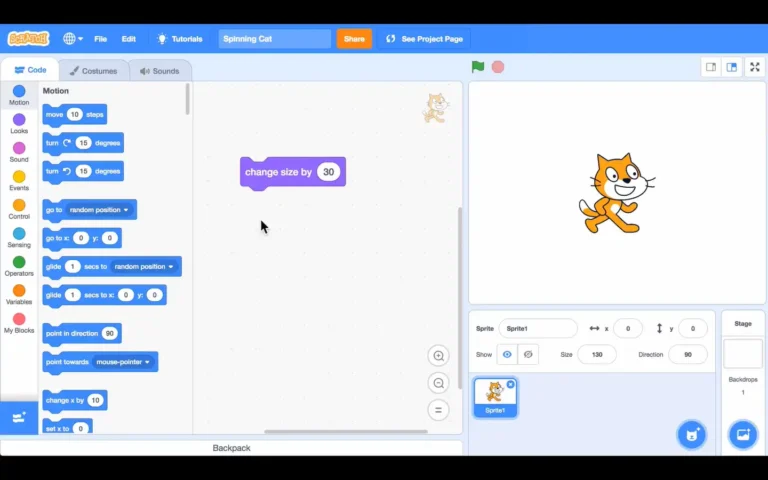
What is Scratch?
Without having to write traditional code, users may create interactive tales, animations, games, and simulations using Scratch, a block-based programming language. Users may generate commands that the machine can understand by dragging and dropping colored coding blocks rather than typing out complicated grammar. Beginners may easily grasp the logical progression of programming using this method without becoming bogged down in technical specifics.
Originally created for kids between the ages of 8 and 16, Scratch has gained popularity among adults, educators, and hobbyists seeking an engaging and interactive approach to learning the basics of programming.
Features of Scratch for Windows
Scratch on Windows offers many features to enhance your experience:
Intuitive Drag-and-Drop Interface:
The block-based programming environment in Scratch is attractive and easy to understand. The coding block is divided into sections such as motion, control, sensing, and operator. Makes it easy to find what you’re looking for.
Sprite Creation and Animation:
Scratch lets you create and animate sprites. (a character or object) that can act as the focal point of your project. You can use pre-made sprites from the Scratch library or design your own. Animating these sprites is as easy as dragging and dropping blocks to customize movement, sounds, and interactions.
Sound and Music:
Scratch also supports sound integration. You can record your own sounds or use the built-in sound library to add audio effects and music to your projects.
Interactive Projects:
The visual programming language in Scratch makes it easy to create interactive projects. You can add keyboard and mouse event handlers, which makes it possible to control your project in real time.
Share Your Creations:
Scratch has a vibrant online community where you can share your projects and explore those created by others. You can remix other users’ projects to make your own unique versions and collaborate with people from around the world.
How to Install Scratch on Windows
You can use Scratch directly from the web via your browser at scratch.mit.edu. However, if you prefer a desktop version, Scratch offers a downloadable application for Windows that works offline. Here’s how to get started:
Step 1:
- Download Scratch Desktop
- Visit the Scratch Website: Go to scratch.mit.edu/download on your Windows computer.
Choose the Windows Version: You’ll see an option for the desktop version of Scratch. Click the download button to get the installer file.
- Once the installer is downloaded, open the file and follow the on-screen instructions to complete the installation process.
Step 2:
- Launch Scratch
- After installation, you can find the Scratch icon on your desktop or in the Start menu. Simply double-click it to launch the application. Once the Scratch interface is open, you’re ready to start creating!
Benefits of Learning Scratch
Creativity and Problem-Solving: Scratch allows you to bring your ideas to life, whether you’re creating a game, a story, or an interactive animation. As you experiment with different blocks and design your projects, you’ll improve your problem-solving skills and creative thinking.
Introduction to Programming Concepts: Even though Scratch doesn’t require you to write traditional code, it teaches important programming concepts like loops, conditionals, variables, and events. These concepts are transferable to more complex languages like Python, JavaScript, or C++.
Fun and Engaging: Scratch is not just a tool for learning; it’s also a fun way to express yourself. Whether you’re a child learning the basics of programming or an adult looking to explore your creative side, Scratch makes coding enjoyable.