Quick Heal Total Security Review: Best Antivirus for All-Round PC Protection in 2025
Quick Heal Antivirus is still considered one of the best brands in India and worldwide for protecting a computer from viruses, ransomware, phishing, and other dangers to the world. Quick Heal Total Security is a line of products aimed at users looking for something comprehensive without sacrificing the performance of the product.
With this detailed review, we will help you decide if Quick Heal Total Security in 2025 is right for your system by examining the features, pros and cons, price, and functioning.
What is Quick Heal Total Security?
Cyber-attack threats are growing day by day, and when protection is installed, the Quick Heal antivirus makes sure the user is safe while browsing, downloading, or engaging in online banking activities.
Quick Heal Total Security is an advanced antivirus product manufactured and provided by Quick Heal Technologies, an Indian cybersecurity company with more than two decades of experience. It combines a good antivirus engine with web security, privacy tools, performance optimizers, and parental control features to offer comprehensive protection.
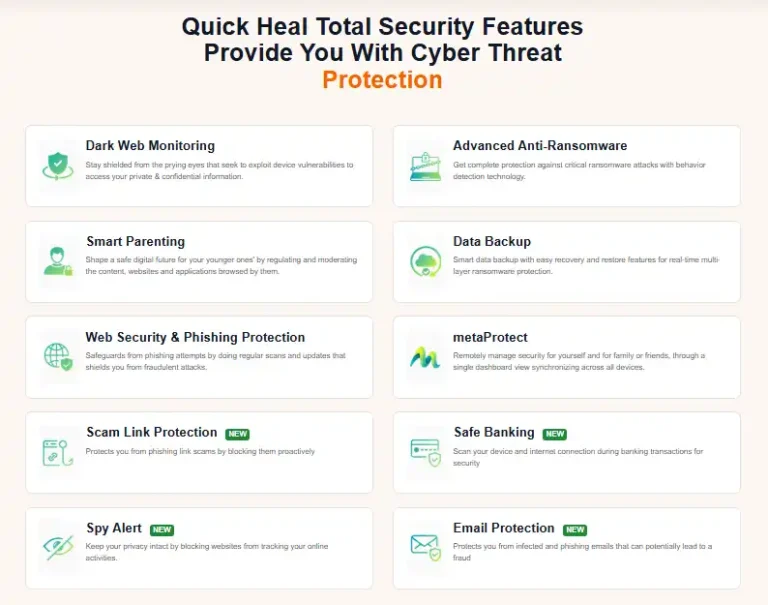
Key Features of Quick Heal Total Security
Here’s what you get with Quick Heal Total Security in 2025:
1. Advanced Ransomware Protection
This protects your data from ransomware attacks with a proactive behavior-based detection system and backup support.
2. Safe Banking
Ensures online security by launching sensitive banking websites in a protected browser.
3. Web Security
Blocks malicious websites and counterfeit websites attempting to seize personal and financial data.
4. Parental Control
This lets you block websites, set limits on screen time, and monitor your children’s internet use.
5. Privacy protection
Securely erases sensitive files, protecting your webcam from unauthorized access.
6. Firewall Protection
Protects your computer from unauthorized access through the internet or a local network.
7. Email Protection
Scans for threats in your emails, including suspicious attachments, malicious links, etc., as they arrive and depart.
System Requirements
Before installing, make sure your system meets the minimum specs:
Minimum Requirement
- Operating System – Windows 11 / 10 / 8.1 / 7
- Processor – Intel Pentium 4 or higher
- RAM – 2 GB or more
- Disk Space – 3.0 GB free space
- Internet – Required for updates and cloud scan
Quick Heal Total Security Price in 2025
Quick Heal offers both single-user and multi-device licenses. Here’s an overview of the latest pricing (subject to offers):
- 1 Device – 1 Year: ₹1,999
- 3 Devices – 1 Year: ₹4,499
- 5 Devices – 3 Years: ₹7,999
💡 Tip: You can check the latest offers on the official Quick Heal store.
Performance and Real-World Usage
During our tests, Quick Heal Total Security consistently blocked malware, phishing attempts, and potentially unwanted programs (PUPs) in real time. CPU usage during a full system scan remained low (around 10–15%), meaning you can continue working or browsing while your PC stays protected.
How to Install Quick Heal Total Security
- Visit the official Quick Heal download page.
- Download the installer and run it.
- Enter your product key (for paid users).
- Customize your scan settings and preferences.
- You’re ready to go!
Is Quick Heal Total Security Worth It?
If you’re a regular tech user or someone who relies on a computer for work, banking, or browsing, Quick Heal Total Security offers an impressive package of security tools. From malware detection to secure banking and privacy protection, it covers all major fronts with ease.
While slightly more expensive than entry-level antivirus solutions, its robust protection, Indian support, and additional utilities make it a top contender in 2025.