Ultraviewer

UltraViewer

For Windows Free

UltraViewer for Windows – Free Remote Desktop Software Download

In the current digital age, remote access and support solutions are now important for both consumers and organizations. Whether you are helping friends and family with your computer difficulties, debugging software, or providing technical support, it is important to have a proper equipment. Ultraviewer is a device that has become more famous in recent years.

It is a free and user friendly Windows Remote Desktop Program. It is an effective tool for anyone that wants to use a machine from a distance or wants to provide remote assistance as it enables users to connect and operate distant computers on the Internet.

What is UltraViewer?

A remote desktop program called Ultraviewer for windows was designed to provide users the ability to manage another machine from a distance. It acts similar to other remote access programs such as Chrome remote desktop, anydesk and teamviewer, but it emphasizes speed, ease of use and portability.

Users can connect to a distant computer using Ultraviewer without being physically present on the machine. After connecting, you can use the mouse and keyboard, look at the desktop of a distant computer, and if you were physically there, you can do the same operation.

Key Features of UltraViewer

It comes with several features that make it a great choice for remote access and support:

1. Easy Setup and Installation

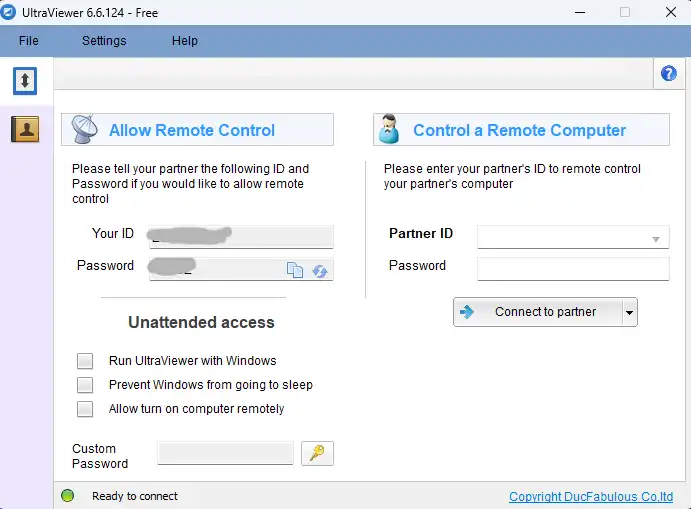
One of the standout features of Ultraviewer for windows is its simplicity. The setup process is incredibly easy, and users can quickly install the software without any technical knowledge. Once the installation is complete, users are provided with a unique ID and password, which they can share with the person they want to connect with.

2. Remote Desktop Control

The remote desktop software enables users to access all functions of the connected remote computer. After establish a connection user remotely access the computer. The remote desktop system enables users to access all functions through interactive use, which includes file opening, problem-solving activities, and presentation demonstrations.

3. File Transfer

Users can transfer files between their local system and the remote system through this application. This function serves as an essential tool for both document and software sharing which is needed to solve technical issues. Users can transfer files between their two computers through a straightforward and rapid file transfer system which allows them to drag and drop files.

Ultraviewer for windows interface

4. Safe and Secure Connection

Remote desktop tools create security risks which UltraViewer handles with complete dedication to security The system prevents unauthorized access by using unique identification methods and password protection, which restricts access to authorized users only.

5 Multi-Task Support

UltraViewer enables users to operate multiple tasks through its functionality, which allows them to switch remote computer screens without difficulty.

6. Lightweight and Low Resource Usage

The software operates as a lightweight program which requires minimal system resources for its functions. The software enables users to run other applications together with remote sessions without experiencing performance problems.

7. Free for Personal Use

UltraViewer provides free remote access for personal use which makes it an ideal solution for users who want to work remotely without paying for subscription services.

How to Use UltraViewer on Windows

The process of using UltraViewer on Windows operates with simple steps which users can follow. Here’s a step-by-step guide:

1. Download and Install UltraViewer

Download UltraViewer from its official website at https://www.ultraviewer.net/ page. For installation process run the installer while following the on-screen instructions.

2. Launch the Program

Launch UltraViewer after complete the installation process. The system will generate ID and password for remotely access computer.

3. Establish a Connection

For establish a connection enter id and password and wait for the remote user to give you permission which will enable you to start remote control of their computer.

4. Enjoy Remote Control and File Transfers

The established connection enables you to execute various activities which include file access and technical problem resolution and computer file transfers.


UltraViewer for Windows System Requirements

Component Requirements
Operating System Windows 7,8,8.1,10,11
Processor Intel or AMD (1GHz or Higher)
RAM !GB (2GB recommended)
Storage 50MB free disk space
Internet connection Stable connection required

UltraViewer operates exclusively on Windows systems while macOS and Linux platforms remain unsupported.

Is UltraViewer Safe to Use?

Yes, UltraViewer for windows is safe and secure when it’s used in a proper way. It uses encrypted connections to protect all data during remote sessions. For unauthorized risk in each sessions it generate id and password dynamically.

Security Tips:

  • Your ID and password should never be shared with anyone under any circumstances
  • You should exit UltraViewer at any time you no longer need to use the program
  • You should use both antivirus software and UltraViewer together
  • You must perform regular download of software updates for your system.

Best Use Cases for UltraViewer

It is ideal for:

  • Freelancers providing remote support
  • Students helping friends with PC issues
  • Small businesses with basic remote access needs
  • Work-from-home employees

Conclusion

UltraViewer for Windows is an excellent choice for users who need a free, simple, and reliable remote desktop solution. UltraViewer enables users to perform remote access tasks which include troubleshooting issues and sharing files although it does not compete with premium remote detktop tools.

UltraViewer serves as an excellent remote desktop solution because Windows users should test its lightweight remote desktop software capabilities.

Ultravieweer for windows

Technical Specification

License

Free

Version

6.6.124

Latest Update

19/07/2025

Operating System

Windows

Developer

Ultraviewer

License

Free

Version

6.6.124

Latest Update

19/07/2025

Operating System

Windows

Developer

Ultraviewer

  • Free for personal use.
  • Simple and user-friendly interface.
  • Fast remote connection.
  • Lightweight and low system usage
  • Built-in chat and file transfer
  • Cross-platform support.
  • Limited features.
  • Occasional connection issues.
Ultraviewer

UltraViewer

For Windows Free

Leave a Reply

Your email address will not be published. Required fields are marked *